Spring 2026 Feature Release: Multi-Org Support and Connecting Training to Your Assets
Spring has arrived.
The winter coats are going back in the closets in exchange for some thinner and brighter threads. Warm feelings found in the sunshine are just around the corner; and warm feelings found in our Spring release are budding throughout this quick article!
We’ve rolled out some dynamic improvements for you and your team, centering around Multi-Organization Support and Connected Training to Your Assets. These specific updates are designed to eliminate login friction and create a stronger course management connection between your educational content and assets.
Multi-Organization Support: One Identity
Managing multiple locations or entities no longer requires multiple accounts, allowing you to use one email and one password across the entirety of Aetos.
Simply put, Multi-Organization Support provides:
- One Set of Credentials: Use one email and password to access every organization you belong to.
- Instant Switching: Jump between organizations without logging in and out.
- Scoped Permissions: You can hold different roles in different organizations. For example, you can be an Admin at a specific plant while maintaining View Only access at another facility. The interface automatically adjusts based on your specific permissions for that location.
Note on User Seats: A common question with multi-org support is whether an account counts as two seats if it belongs to two organizations. The answer is no. Aetos supports unlimited users, so you can provide access to as many team members as needed across any number of organizations without worrying about additional seat costs.
Connect Training to Your Assets
Connecting training to your assets allows operators to have the right guidance at the right equipment, ensuring precision and efficiency.
- Train from the Asset: Create a training course directly from any asset to teach operators how to use, maintain, or troubleshoot it. Your content can be further contextualized to each specific piece of equipment.
- Filter Courses by Asset: Training assignments and onboarding can be based on specific assets. Easily assign and track learning based on the equipment an operator is certified to use - or needing to learn.
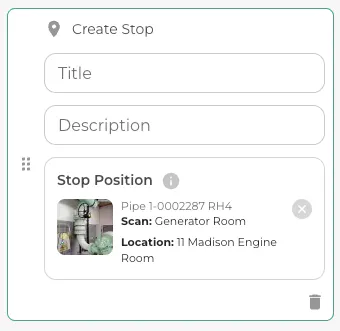
- Asset Guided Learning: When designing training, you can now use a specific asset tag as a stop along your chapter or course.
Additional Training Improvements
We’re listening! Aetos has deployed a few Training improvements that further improve your training management experience.
These changes focus on clearer terminology, better library organization, and improved accountability for assignments.
- Introducing "Stops": We’ve updated our terminology to better align with how work happens in the field. When you are creating a course, you will now "Add a Stop" for the next step in the learning experience. Whether it’s a general location in a scan or a specific asset, a "Stop" represents a deliberate point of interest in the training flow. This change makes the transition from digital training to on-site execution more intuitive for both creators and trainees.
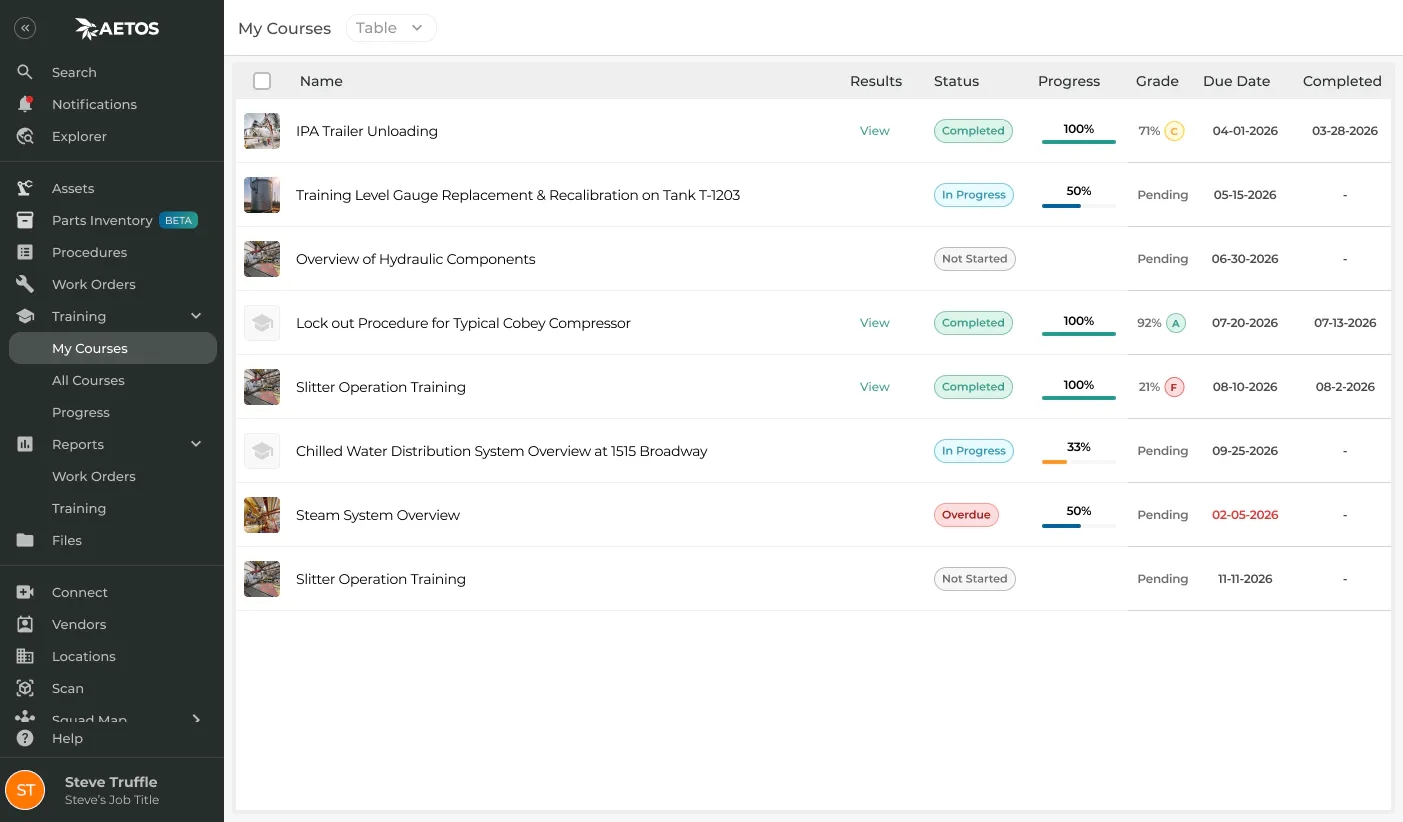
- My Courses / All Courses: To make navigating the training library more efficient, we’ve updated the UI with a simple toggle between My Courses and All Courses. "My Courses" is a personalized view of training specifically assigned to you; "All Courses" is – you guessed it – all the courses your organization has published.
- Due Dates / Assignments: Due dates can be set for training courses to ensure compliance and timely onboarding. Now you can filter your dashboard by due date, making it easy to prioritize upcoming deadlines. (Note for Admins: You can monitor team progress at a glance, tracking who has completed their training and who has upcoming assignments based on specific due dates or training content.)
Continuously Improving
These updates are a deliberate move to lower platform friction. By providing a unified login and asset-linked training capabilities, we’re contributing even more toward your “Single Pane of Glass” experience.
Like the fresh Spring air, let our updates be invigorating to your internal operations! Log in today to see these features, or contact our support team for a walkthrough - and stay tuned for our next release!
Spring 2026 - Quick FAQS
Q: What’s the TL;DR of the Spring 2026 Release? A: Multi-Organization Support gives your account a more comprehensive experience when you’re a part of many organizations; Connect Training to Your Assets further links your education course content and digitized asset bank for even better operator support and learning management.
Q: If I belong to multiple organizations, do I need multiple accounts? A: No. You use a single email and password to access every organization you are a part of. You can switch between them instantly from the main menu without logging out.
Q: Will I be billed for "two seats" if a user belongs to two different plants? A: No. Aetos is proud to support unlimited users. Whether a team member is active in one organization or ten, they only count as one person. We want you to scale your team's access without worrying about seat-based costs.
Q: Can I have different permissions in different locations? A: Yes. We use Scoped Role-Based Access. You can be an Admin with full editing rights at your home organization, but have "View-Only" access at a secondary location. Your interface will automatically adjust based on where you are currently working.
Q: What is "Asset-Based Learning"? A: Asset-Based Learning is an advanced training method that directly integrates a physical asset (such as a machine, tool, or piece of equipment) into the digital training process. It ensures that the learning content is specifically contextualized, targeted, and relevant to the exact asset the trainee will be working with.
Q: How can I create training "directly from the asset"? A: This capability allows users (typically instructional designers or subject matter experts) to start the creation of a new training course or module by selecting a specific asset in the system. In the asset panel on the left, users can then create a course from the asset - similar to the course creation methods in the “Training” module.
Q: Can I associate Assets to courses I’ve already created? A: Yes. Within the Training module, you can now Edit a course or chapter to include an asset relevant to that content, further connecting your digital tools.
Q: Can this be used for ongoing certification? A: This workflow is designed for both initial onboarding and continuous certification. It can be used to assign refresher courses, re-certification modules, or training on newly introduced equipment, all based on the specific assets an employee is responsible for.
Q: What is the main benefit of linking training content to a specific asset? A: Immediate access. The main benefit is increased relevance and reduced risk for your operators. Linking content to specific equipment ensures that the operator is prepared for relevant tasks pertaining to that asset such as unique operating procedures, How-Tos, or generalized best practices, closing the gap between general training theory and real-world operational practice.
Q: What is a “Stop” in a training course? A: A “Stop” is the new term for a learning target within a course. Just as an operator stops at a machine in the field, you now “Add a Stop” in the digital scan to direct a trainee to a specific location or asset.
Q: Can I see courses that aren’t specifically assigned to me? A: Yes. Using the new UI toggle, you can switch from "My Courses" (your specific assignments) to "All Courses" to browse your organization’s entire training library.
Q: As an admin, can I see who is falling behind on their training? A: Yes. The new assignment tracking allows you to see your team's progress and identify upcoming or overdue courses based on the specific due dates you've set.